NOTE · ROBOTICS · 28 AUG 2026
The Unitree G1’s voice isn’t a file.
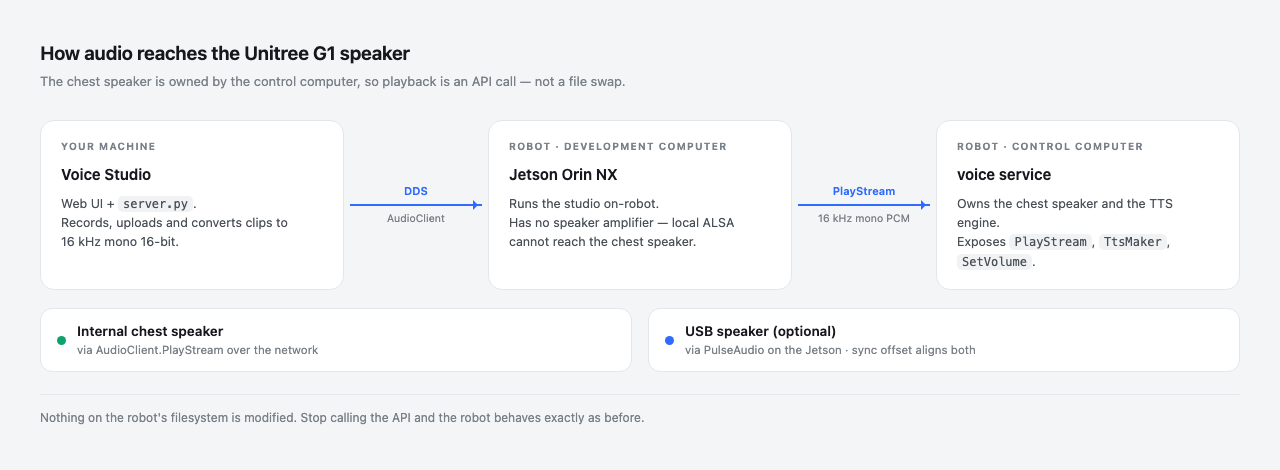
The chest speaker belongs to a second on-board computer, not the one you log into. The way in is the SDK.
I wanted my Unitree G1 to say my own lines instead of its stock prompts. The obvious plan is to find the prompt audio on the robot’s disk and replace it, and I built most of a toolchain around that plan: a scanner, a backup script that records checksums, a converter that matches the original file’s exact format, a restore path for putting it all back.
Then it turned out there is no such audio on the disk. This is the sequence I went through, including the parts that wasted time.
What I expected to find
A robot that says “Battery low” out loud is getting that audio from somewhere, so I went looking for it. A scan of the robot’s development computer turned up about fifty-five audio files.
All of it was stock desktop audio: the alsa-utils channel
test clips, the Debian sound-icons set, GNOME alert sounds,
speech-dispatcher fixtures.
One hit was COPYING.opus, a licence text file that matched
because the first pass filtered on extension. The scanner in the
repository now validates with file --mime-type and keeps
only audio/* and application/ogg.
mime="$(file --mime-type -b "$path")"

case "$mime" in
  audio/*|application/ogg) is_audio=1 ;;
  *)                       is_audio=0 ;;
esac
One command settles it
The check that ends the search is package ownership:
on the robot
$ dpkg -S /usr/share/sounds/alsa/Front_Center.wav
alsa-utils: /usr/share/sounds/alsa/Front_Center.wav
If a distribution package owns a file, that file arrived with the
operating system. Across every candidate nothing survived: no unowned
audio file on the disk could plausibly be the robot’s voice, which
invalidated the file replacement premise entirely. The scanner labels
each file STOCK_PKG or UNOWNED so the set can
be read at a glance.
The backup and restore scripts I had written by that point were solving a problem that does not exist.
pkg="$(dpkg -S "$path" 2>/dev/null | head -1 | cut -d: -f1)"
[ -z "$pkg" ] && pkg="UNOWNED"

if   [ "$is_audio" -eq 0 ];   then class="NONAUDIO"
elif [ "$pkg" != "UNOWNED" ]; then class="STOCK_PKG"
else                               class="CANDIDATE"
fi
The voice is synthesized at runtime
The G1’s spoken prompts are produced on demand by an on-board
service. There is no directory of prompt WAVs, which is why the search
came up empty. Custom audio has to go in through the SDK instead,
specifically the unitree_sdk2 AudioClient.
One consequence is that there is no rollback procedure to write. Nothing on the robot’s filesystem is modified, so stopping the API calls returns the robot to how it was.
from unitree_sdk2py.core.channel import ChannelFactoryInitialize
from unitree_sdk2py.g1.audio.g1_audio_client import AudioClient

ChannelFactoryInitialize(0, iface)   # iface reaches the robot
client = AudioClient()
client.SetTimeout(10.0)
client.Init()
Two computers, one speaker
The G1 has two on-board computers. The Jetson Orin NX is the development computer, the one you log into and run your own code on. The second is the control computer, and it owns the chest speaker and the TTS engine.
The Jetson has no speaker amplifier. I worked through
aplay, then paplay, then the Tegra APE mixer
controls, looking for a route that would come out of the chest. No
ALSA configuration on the Jetson will drive that speaker, because the
amplifier is not attached to that computer.
The symptom that kept me there was the API call returning success while the robot stayed silent. The RPC was accepted and answered, just not by the machine I was sitting at and listening to. I was reading a return code as though the two computers were one.
I did not work this out from nothing. experientialtech/g1-audio-driver, which exposes the G1’s microphone array and speaker as ordinary PulseAudio devices so that any Linux application can use them, already had this architecture mapped, and it is where this project started.
The last blocker was an SDK version gap
With the architecture understood, the call to make is
PlayStream. The SDK present on the robot did not have it.
AudioClient exposed TtsMaker,
GetVolume and SetVolume, and nothing else.
The check is one line:
python, on the robot
>>> hasattr(client, "PlayStream")
False
The gap went deeper than a missing wrapper. The RPC client underneath
lacked the binary request method that PlayStream needs in
order to carry PCM, so writing the wrapper myself would not have
helped.
Vendoring a current unitree_sdk2_python fixed it.
PlayStream wants 16 kHz, mono, 16-bit PCM, sent in chunks
under one stream id:
REQ_RATE, REQ_CHANNELS, REQ_SAMPWIDTH = 16000, 1, 2
CHUNK_BYTES = 32 * 1024

stream_id = str(int(time.time() * 1000))   # unique per utterance
for i in range(0, len(pcm), CHUNK_BYTES):
    client.PlayStream(app_name, stream_id, pcm[i:i + CHUNK_BYTES])
client.PlayStop(app_name)
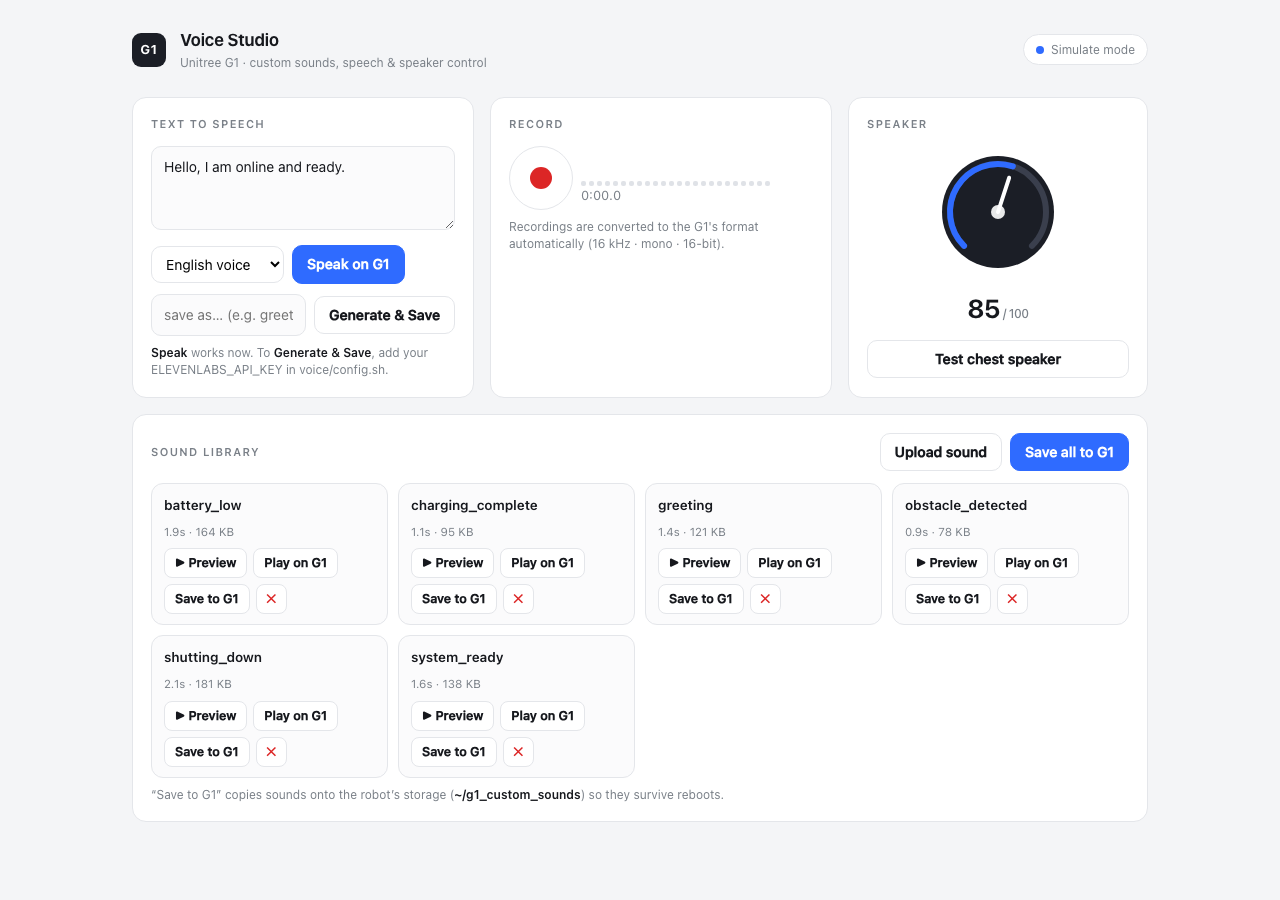
prompts.tsv starts with P01, “Hello. I’m online and
ready.” That is the line sitting in the text box in the screenshot at
the top of this post, and it is the one I keep coming back to when I
want to know whether the whole path is still working.
The catalog is risk tiered. L3 lines are the ones tied to safety behaviour, and the batch tooling skips them unless you ask for them by name, because a robot that announces an emergency stop in a voice I rendered should be a deliberate choice.
There is also TtsMaker(text, speaker_id), where
speaker_id 0 is Chinese and 1 is English. On some firmware
it returns success without producing audible output. What separates the
firmware where that happens from the firmware where it does not is
something I have not pinned down. Rendering the line to a WAV and
sending it through PlayStream removes the dependency, so
that is what the batch tooling does.
voice/prompts.tsv, 4 of 16 rows
id   event              risk  text
P01  startup_ready      L1    Hello. I'm online and ready.
P08  battery_low        L2    Battery low. Please charge me soon.
P12  obstacle_detected  L2    Obstacle detected.
P15  emergency_stop     L3    Emergency stop activated.
Loudness, and why matching LUFS was not enough
The first pass normalized every clip with
loudnorm=I=-16:TP=-1.5:LRA=11. Downloaded sound effects
came out fine. Speech at the same integrated loudness sounded clearly
quieter.
scripts/generate_voices.sh, the first pass
ffmpeg -f s16le -ar 16000 -ac 1 -i "$raw" \
       -af "loudnorm=I=-16:TP=-1.5:LRA=11" \
       -ar 16000 -ac 1 -c:a pcm_s16le "$tmpwav"
Integrated LUFS is an average across the clip. A mastered sound effect is compressed close to brick wall, so its average sits near its peak and it is loud essentially all the time. Speech has a wide dynamic range, so much of the clip sits well below its own peaks, and those peaks still have to fit under the true peak ceiling. Same number, different perceived loudness.
The fix is to compress the dynamic range first, then level the clip toward full scale, then limit so the result cannot clip:
the chain that replaced it
acompressor=threshold=0.06:ratio=4:attack=5:release=130:makeup=3,
dynaudnorm=f=200:g=15:p=0.9:m=12,
alimiter=level_in=1:level_out=1:limit=0.97
Every clip entering the library goes through that chain, so speech and effects land at a comparable perceived loudness.
Speaker volume is separate. SetVolume takes 0 to 100 and
is the hardware control. Above 100 the studio applies a software boost
by multiplying the 16-bit samples before streaming.
audioop.mul saturates at the sample limits, so pushing
past the hardware maximum clips hard instead of turning to noise.
audioop was removed in Python 3.13, so the import is
guarded and the boost is unavailable there.
try:
    import audioop          # stdlib, removed in Python 3.13
except Exception:
    audioop = None

if gain and abs(gain - 1.0) > 0.01 and audioop is not None:
    pcm = audioop.mul(pcm, REQ_SAMPWIDTH, float(gain))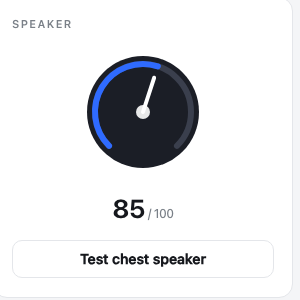
A second output
A USB audio device plugged into the Jetson shows up as an ordinary
PulseAudio sink, and unlike the chest speaker it is local, so
paplay drives it directly. Playing to both at once needs
an offset, because the internal path crosses the network to the control
computer while the USB path does not.
The studio exposes that offset in milliseconds, defaulting to 180, and includes a click train for tuning it by ear: a short 2 kHz blip every 500 ms. When the two outputs are aligned you hear single tight clicks, and when they are not you hear a flam. That is a cruder method than measuring it, and it converges faster.
g1-audio-driver solves the same problem a different way,
loading PulseAudio’s module-combine-sink to aggregate
the outputs into one device. That is tidier than what I do, and it is
the better choice if you want the robot to behave like a normal sound
card. I play to the two outputs separately because a combined sink
gives me nowhere to put the offset.
# positive holds the USB side, negative holds the internal side
_sync_ms = 180

# a 15 ms blip at 2 kHz every 500 ms, for tuning that by ear
expr = r"0.7*sin(2*PI*2000*t)*lt(mod(t\,0.5)\,0.015)"
cmd = ["ffmpeg", "-f", "lavfi",
       "-i", f"aevalsrc={expr}:d=3:s=16000",
       "-ar", "16000", "-ac", "1", "-c:a", "pcm_s16le", click]
What is in the repository
Voice Studio runs on localhost or on the robot itself and handles
uploading, recording, conversion, text to speech and playback.
prompts.tsv maps robot events to English lines for batch
generation. There is a simulate mode that exercises every code path
with no SDK and no robot, which is how most of the UI got built.
The docs/ and the scanning scripts are the remains of the
file replacement approach. I kept them, because they are still the
right tools for genuine on-disk audio, and because the scan is how you
prove to yourself that the G1’s voice is not there.
github.com/szwedk/g1-custom-sounds
g1-custom-sounds/
├── README.md
├── docs/                  architecture and procedures
├── scripts/               scan, backup, convert, generate, deploy
└── voice/
    ├── prompts.tsv        event to English line catalog
    ├── app/               Voice Studio server and web UI
    ├── lib/g1_play.py     AudioClient wrapper
    └── deploy/            robot-side launcher and systemd unit
Scope
This project plays audio and manages audio files. It does not touch firmware, motion, or safety systems, and it does not modify anything on the robot’s filesystem.
Credits
experientialtech for
g1-audio-driver,
which inspired this project and which parts of it draw on. It bridges
the G1’s four-microphone array and its speaker into standard
PulseAudio devices, and it reaches the speaker over the same
AudioClient.PlayStream path this project uses. If you want
the robot’s audio hardware to appear as an ordinary Linux sound card
rather than a managed clip library, start there.
Unitree Robotics make the robot and the SDK both
projects depend on:
unitree_sdk2_python,
BSD 3-Clause, Copyright (c) 2016-2024 HangZhou YuShu Technology Co.,
Ltd. The AudioClient API, including
PlayStream, TtsMaker and
SetVolume, is theirs. This project is a client of that
API, built on Unitree’s official SDK rather than forked from it.
ElevenLabs provides the optional text to speech used to render the English prompts.
Repository: github.com/szwedk/g1-custom-sounds.